

Kwugwo is a Software-as-a-Service payment orchestration tool that gives businesses control over how their payments are processed. With Kwugwo, you decide which provider handles a payment in a given scenario, and what the experience looks like for your customer.
In simpler terms: we route payments for you — reducing payment failures, and giving you broader coverage across providers and currencies.
This guide walks you through the very first thing you will do on Kwugwo: creating your business on the platform (your Nzube), switching between businesses, and disabling or deleting one when you no longer need it.
Who this guide is for: anyone setting up Kwugwo for the first time; founders, finance leads, and developers.
Time to complete: about 5 minutes.
Before You Begin#
Make sure you have the following ready:
- A registered Kwugwo account. If you do not have one yet, sign up at app.kwugwo.africa. You do not need to verify your email address first. You can create your Nzube immediately after signing up.
- Your business, company, or organization name as you want it to appear on the dashboard.
- An email address to receive payment alerts and workspace notifications. This can be your account email, but a shared inbox (for example,
payments@yourcompany.com) is usually a better choice.
The Concepts#
There are a few concepts that are unique to Kwugwo. In building an African product, we borrowed some African words that you will see throughout the application. Here is what each one means:
| Term | Pronunciation | What it means |
|---|---|---|
| Nzube | A business. This is the entity Kwugwo knows and works with. Every other action and feature on Kwugwo is tied to an Nzube. | |
| PSP | A Payment Service Provider: any entity or platform that actually processes payments (for example, a gateway or acquirer). | |
| Ugwo | A payment request. An Ugwo can be submitted and retried across multiple PSPs, and can contain multiple payment method attempts. | |
| Onye | A customer of your business, from whom you accept payments. |
How the concepts fit together#
A simple way to hold all four in your head:
Your Nzube (business) accepts an Ugwo (payment request) from an Onye (customer), and Kwugwo routes that Ugwo to one or more PSPs until it succeeds.
Because an Ugwo can be retried across several PSPs and payment methods, a single payment request may produce multiple processing attempts. This is the core of what Kwugwo does; a failure at one provider does not have to mean a failed payment.
Sandbox and Live Environments#
Before you create anything, it helps to know that Kwugwo has two completely separate environments:
- Sandbox: for testing your integration without moving real money.
- Live: for real payments from real customers.
You switch between them using the environment toggle at the top of the page.
The two environments are fully independent. An Nzube created in Sandbox does not exist in Live, and vice versa. The same applies to their configuration, records, and API keys. When you are ready to go live, you create your Nzube again in the Live environment and set it up there.
Tip: Give your Sandbox and Live Nzube the same name. It keeps things recognisable, and because the environments are separate there is no risk of confusing one for the other in a list.
Getting Started#
As described above, the Nzube is your starting point on Kwugwo. Once you are registered as a user, you need to create an Nzube before you can manage or route any payments.
Let's create one.
Creating an Nzube#
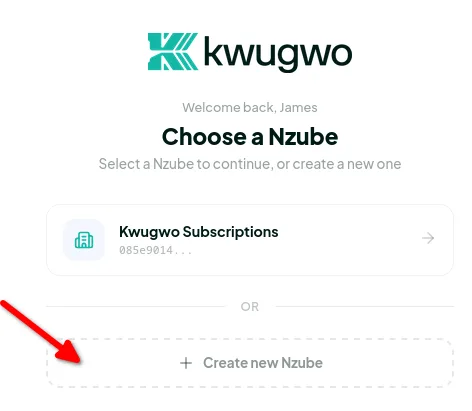
On initial registration, the first page you land on prompts you to create an Nzube. It looks something like this:
To create your Nzube:
- Confirm you are in the environment you want; Sandbox or Live, using the toggle at the top of the page.
- Click Create new Nzube.
- Enter your Nzube name, which is the name of your business, company, or organization.
- Enter an Email, which is the address where payment alerts and other workspace notifications are sent. This defaults to your account email; change it if you have a dedicated address.
- Submit the form.
Field reference
| Field | Required | Notes |
|---|---|---|
| Nzube name | Yes | Business, company, or organization name. Can be changed later in Nzube Settings. |
| Yes | Receives payment alerts and workspace notifications. Defaults to your account email. Can be changed later in Nzube Settings. |
Voila! Your Nzube is created. It is that simple.
Tip: Use a name your team will recognize at a glance. If you plan to run separate Nzube for different regions, brands, or environments, include that in the name. For example, "Acme Nigeria" and "Acme Ghana".
Neither field is permanent. You can update your Nzube name and notification email at any time from Nzube Settings in the sidebar.
Switching Between Nzube#
You can create as many Nzube as you need, and switch between them from within the dashboard at any time.
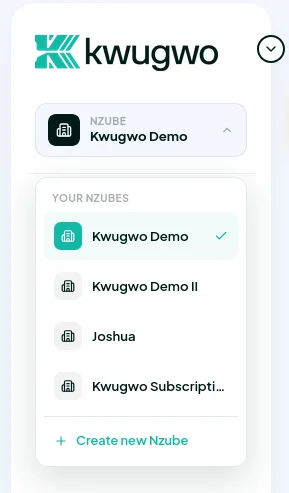
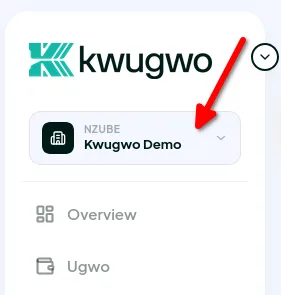
The Nzube switcher is at the top of the sidebar. It displays the Nzube you are currently working in, a list of all the Nzube you have access to, and, at the bottom of that list, an option to add a new one.
To switch:
- Click the Nzube name at the top of the sidebar.
- Select the Nzube you want from the list.
- The dashboard reloads in the context of the selected Nzube.
Important: Everything you see and do in the dashboard; records, configuration, PSP connections, API keys, and Ugwo, belongs to the Nzube you currently have selected. Before making a change, confirm which Nzube is active, and which environment you are in.
A note on billing: there is no limit on how many Nzube you can create, and creating one costs nothing on its own. However, each Nzube carries its own independent subscription. Running five Nzube means five separate subscriptions.
Managing an Nzube#
Disabling or Deleting an Nzube#
An Nzube can be either disabled or deleted.
In some cases you may want to temporarily stop accepting payments for a specific Nzube while keeping access to its dashboard, records, team members, and configuration. That is what disabling is for. The Nzube can be re-enabled later.
Deleting is permanent and takes effect immediately. When an Nzube is deleted, all of its records and configuration are deleted along with it.
In both cases, API requests to that Nzube stop working, including payment acceptance.
Disable vs. delete at a glance
| Disabled | Deleted | |
|---|---|---|
| Accepts payments | No | No |
| API requests | Fail with 401 Unauthorized | Fail with 401 Unauthorized |
| Dashboard access | Yes | No |
| Records and reports | Retained | Deleted |
| PSP configuration | Retained | Deleted |
| Who can do it | Owner or Admin | Owner only |
| Reversible | Yes, and re-enable at any time | No |
To disable or delete an Nzube:
- Make sure the Nzube you want to act on is the one currently selected in the sidebar.
- Open Nzube Settings at the bottom of the sidebar.
- Go to the Danger Zone tab. Both options are presented there.
- Select Disable or Delete.
- For deletion, you will be asked to type the Nzube name to confirm. This is deliberate. There is no undo.

What happens to payments in flight
Any Ugwo still in progress when an Nzube is disabled or deleted will be denied. Note, however, that a payment attempt that has already reached a PSP may still settle on the PSP's side, as Kwugwo can stop routing, but it cannot reverse what a provider has already processed. Check directly with your PSP for anything that was mid-flight.
What happens to your subscription
Kwugwo is a SaaS product, so there are no customer balances or settlement funds held in your Nzube. What happens to your subscription depends on which action you take:
- Disabled: your subscription credit is preserved. It stays in the system untouched while the Nzube is disabled, and becomes available again to be used the moment you re-enable it. You lose nothing by disabling an Nzube you are not currently using.
- Deleted: any remaining value on the subscription is lost along with the Nzube.
Warning: Deletion is immediate and cannot be undone. If your reason for removing an Nzube is that you have simply stopped using it, disable it instead of deleting it; you keep your records, your configuration, and your subscription credit, and you can pick up exactly where you left off later.
Before deleting, export or download any transaction records you are required to keep for accounting, tax, or compliance purposes, and disconnect the Nzube from any live integrations so your application does not start failing in production.
Team Members and Permissions#
Coming soon. Team member invitations and role-based permissions are features we are actively working on. This section will be updated once they are available.
What This Means for Your API Integration#
If you are integrating Kwugwo programmatically, note the following:
- Your API key identifies the Nzube. Every request is made in the context of a specific Nzube, determined by the key you authenticate with. There is no separate Nzube ID to pass.
- Keys are not shared between Nzube. Creating a second Nzube means a separate set of credentials and configuration.
- Sandbox and Live keys are separate too. Because the environments are fully independent, your Sandbox key will not work against Live, and vice versa. Store them as distinct environment variables and never hard-code them.
- Disabled and deleted Nzube both return
401 Unauthorized. Handle this in your integration so a disabled Nzube surfaces as a clear configuration error rather than a generic failure.
Troubleshooting#
I don't see the "Create new Nzube" option.
You may already be inside an existing Nzube. Open the Nzube switcher at the top of the sidebar, the option to add a new one is at the bottom of that list.
I created an Nzube but can't find it.
Check the environment toggle at the top of the page. Sandbox and Live Nzube are entirely separate, so an Nzube created in Sandbox will not appear when you are viewing Live.
I'm not receiving payment alerts.
Check the notification email set on the Nzube in Nzube Settings, and confirm the address is correct. Kwugwo sends from @kwugwo.africa, so allowlist that domain if messages are being filtered as spam.
My API requests suddenly return 401.
Confirm the Nzube has not been disabled or deleted in the Danger Zone, and that you are using a key belonging to the correct Nzube and the correct environment.
I deleted the wrong Nzube.
Deletion is immediate and permanent, so there is nothing to restore from the dashboard. Contact us at hello@kwugwo.africa as soon as possible and we will see what can be done.
Frequently Asked Questions#
Can I have more than one Nzube on the same account?
Yes, as many as you need. You can switch between them from the top of the sidebar. This is useful for separate legal entities, brands, or regions. Keep in mind that each Nzube runs on its own subscription.
Is there a cost to creating additional Nzube?
Creating an Nzube costs nothing, but each Nzube requires its own separate subscription to run.
Does disabling an Nzube delete my data?
No. Disabling only stops payment acceptance and API access. Your records and configuration remain intact and are available again when you re-enable it.
Do I lose my subscription if I disable an Nzube?
No. Your subscription credit stays in the system while the Nzube is disabled and can be used again once you re-enable it. This is not the case for deletion. Deleting an Nzube forfeits any remaining subscription value.
Should I disable or delete?
Disable if you might come back to this business later, or if you just need to pause payment acceptance — you keep your data, your configuration, and your subscription credit. Delete only when you are certain you will never need the Nzube or its records again.
Can I move data from one Nzube to another?
No. Nzube are fully independent, and data cannot be transferred between them.
Do I need to create my Nzube twice — once in Sandbox and once in Live?
Yes. The environments are separate, so an Nzube must be created and configured in each one you intend to use.
What's Next?#
Once your Nzube is set up, the next step is to connect your Payment Service Provider (PSP) — this is what allows Kwugwo to actually route and process payments on your behalf.